Get online, get it done, get back to your people.
Focus Browser starts by asking what you're trying to do. It builds the screen that task needs, keeps everything else out, and closes when you're done.
CodeGitHub repo
Why this exists
- The best thing the web can do for belonging may be to let you leave. Time spent scrolling is time not spent with the people around you.
- Most of the web is built to keep you there. Feeds, autoplay, recommendations and infinite scroll are designed to hold attention, not to finish your task.
- A pause works. Adding a short pause before a social app opened meant 36% of attempts to open it were abandoned (one sec study, PNAS 2023).
- Knowing your intention helps. An AI that knew people's stated intention and nudged them when they drifted cut time off task to 10.4%, against 16.6% with a plain reminder app (INA, 2025 preprint).
How it works
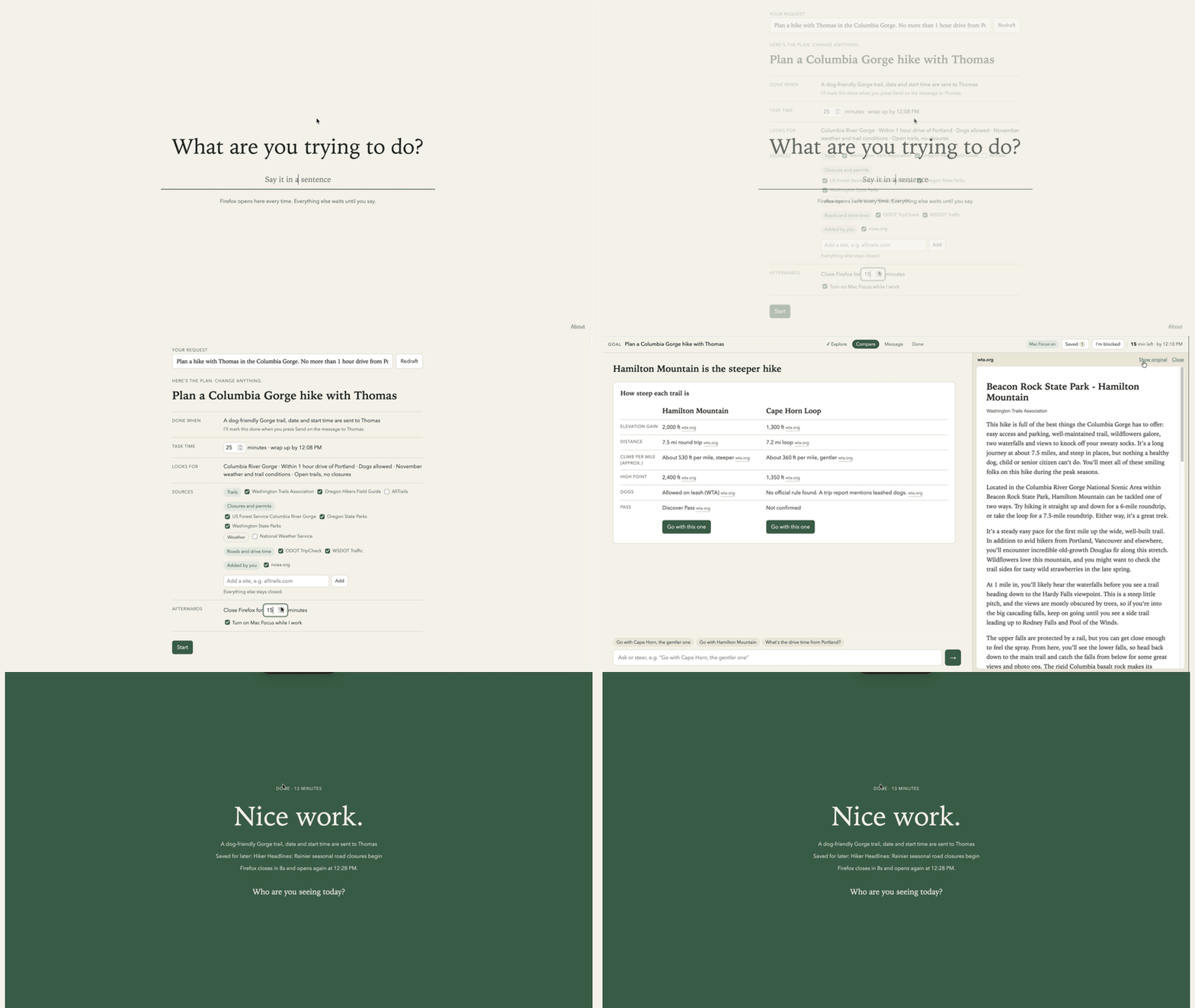
- Say what you're trying to do. Firefox opens to one question, full screen. It can't be skipped.
- Agree on the plan. Your request becomes terms you can edit: what counts as done, how long it should take, which sites it may use, and what happens afterwards. Everything else stays closed.
- A screen built for the task. The AI researches your approved sites and builds each screen from a small set of familiar pieces: options to pick from, a comparison, steps, a checklist, a message. Every fact links to where it came from.
- It changes as you go. Pick two options and the screen becomes a comparison. Choose one and it becomes a message to send. What you've finished with goes away.
- Pages only when you need them. Click any source to read it in a side panel, in reader view, with the clutter removed.
- Detours ask, they don't block. A link that isn't part of the plan asks "save for later?" and goes on a shelf for your next break.
- Steer or ask for help. Type "avoid Washington trails" and the screen redoes itself. "I'm blocked" tells it what you need.
- Done means done. When the done condition is met, you see what you got done and what you saved, then Firefox closes for the break you chose. It can turn on a Mac Focus mode while you work.
How it compares
| A typical browser | Focus Browser | |
|---|---|---|
| Opens to | A feed, a search box, your tabs | One question: what are you trying to do? |
| What you see | Ads, popups, related links, SEO stuffing | The pieces this step of your task needs |
| Sites | All of them | The ones you agreed to |
| Tempting links | One click away | Saved for later |
| When you're done | Nothing tells you | The browser makes you take a break |
How it's made
| Piece | What it does | Where it runs |
|---|---|---|
| Firefox extension, in kiosk mode | The whole interface. Kiosk mode hides the toolbar and tabs, and the extension closes any new tab or window while a task runs | Your computer |
| Readability | Turns a page into clean text for the side panel. It's the library behind Firefox's Reader View | Your computer |
Request rules (declarativeNetRequest) | Let a real site show inside the side panel when you choose "Show original" | Firefox, in the focus tab only |
| macOS Shortcuts | Turns a Focus mode on at the start and off at the end | Your Mac |
UI primitives include:
| Options | Up to three candidates to pick or set aside |
|---|---|
| Compare | Finalists side by side |
| Facts | Labelled facts about one thing |
| Text | A short explanation |
| Steps | Ordered steps to tick off |
| Checklist | Things to bring, buy or prepare |
| Message | A draft you edit and copy |
| Poll | A quick question for a group |
| Notes | A space for your own words |
| Reader | A real page in the side panel |
Informed by:
| Project | What it learned | What Focus Browser takes |
|---|---|---|
| one sec | A short pause before a distracting app opens stops many of those openings | The question you answer before anything else loads |
| Purpose Mode (ACM TOCHI 2025) | Turning off attention-grabbing features on social sites reduced distraction | Reader view: pages without feeds, ads and related links |
| INA (2025) | Intent-aware nudges reduce time off task, but watching the screen every two seconds felt intrusive and was often wrong | Checking only at natural moments, from what the browser already knows. No screenshots |
| Generative UI frameworks, like Google's A2UI | An AI can assemble an interface from a fixed set of components | Ten ordinary pieces, chosen and filled per step |
| Firefox Reader View | Reading feels different when the page is quiet | The library itself, and the look of the side panel |
What we hope to learn
- Will people say what they're trying to do, specifically enough to scope it, most of the time?
- Do they keep to the plan, or override it?
- Is a screen built for the task better than a chat answer, or a list of links?
- Does finishing faster turn into time with other people?
What would end it: most sessions start with vague intentions like "browse", or people override the plan most of the time.
Questions
- Why not just ask a chatbot?
- Three reasons. A chatbot gives you a wall of text, not an interface built for the task: options to pick from, a comparison, a message ready to send. It's built to keep you talking, so every answer invites another question. And nothing stops you wandering off into side questions and tabs. Focus Browser builds the screen the task needs, keeps you inside the plan you agreed to, and ends when the task does.
Concept extensions:
- Trusted sources. Star the sites that worked well, and future tasks use them first. Kept on your device.
- A stronger lock. Pausing other apps and browsers during a task, through the operating system.
- Real sending. The message goes to email or text directly, after you approve it.
- Shared tasks. Two people plan the same trip, each on their own screen, with one agreement.
- Maps and calendars as pieces. More familiar building blocks for the screens.